Running Self Tests on the STB
The boot loader can, optionally, include a module for performing
basic self tests to help diagnose hardware or configuration problems.
For the Self Test option to appear in the menu, the feature SELFTEST
has to be enabled in the STB. If the feature is enabled in the STB the Self
Test option tab will appear in the boot loader menu.
The SELFTEST feature is enabled by adding a license to the
configuration parameters. Contact ARRIS if you are interested in
enabling this feature.
Main flow
-
Enter Boot Loader Configuration Menu.
-
When selecting Self Test, a dialog similar to the one shown
below will appear. Press OK or the Down button to enter the dialog.
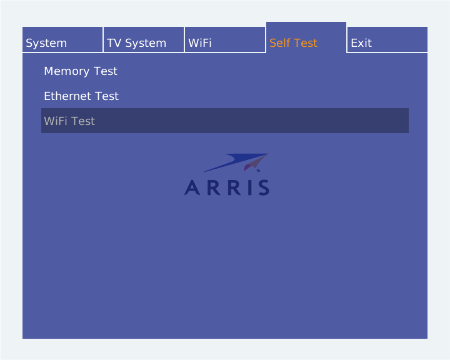
To run a test, navigate to the test and start the test using
the OK button. A progress bar will be displayed to the right
while the test is executing. When the test has finished the
text PASS or FAIL will be shown and
a message with the result of the test will be displayed.
The result message contains information obtained during the
test execution that can help Customer Support in diagnosing
problems with the STB.
| Test name |
Description |
| Memory Test |
Tests the internal memory (DRAM) of the STB. The number of
bytes that where tested will be shown in the result message. |
| Ethernet Test |
Tests the cable network connection. The result message contains
the actual IP address of the STB and information about gateway and
DNS server used by the STB. |
| WiFi Test |
Tests the wireless network connection. This test will be grayed
out if the STB does not have a WiFi network interface or if the WiFi
network interface has not been configured with proper network
parameters. As with the Ethernet Test, the result message contains
the actual IP address of the STB and information about gateway
and DNS servers found. |
-
Return to the main menu by pressing arrow UP or BACK button.

