| ARRIS Enterprises, Inc. Confidential Information |
Media ServiceThe Media Service allows applications to handle media content for different purposes, most importantly, for playback. It connects to the media source and automatically uses the appropriate hardware resources to fetch, decode and, optionally, decrypt the media. Depending on the purpose, applications use the Media Service to create different software resources:
A Media Player allows applications to open and manage media playback sessions. This includes operations such as play, stop, jumping to a position, fastforward, pause and rewind, although the operations actually available may vary depending on the media source. See the Video element documentation for information about how to display media. An application can use the Media Service to create a Media Player by calling
A Media Session represents media that is currently being processed by the Media Service. Every time an application uses a software resource such as the
Media Player to open a playback session, the Media Service assigns a Media Session to it, which is identified by a The purpose of a Media Session is mostly informative and can be useful to applications that do not have access to the Media Player that is managing the playback session. See the Media Session section for more information. The objects returned by the Media Service are proxies, providing an interface for the application to access the corresponding resource instances. A proxy object has an independent life cycle and should not be confused with the resource instance it represents. ConfigurationIn any playback session there are always several elements to consider:
In order to enable support for a particular source, stream format, encoding or CA system the appropriate protocol, container and license IIPs must be added to the boot image. For example, a possible configuration could include the following IIPs:
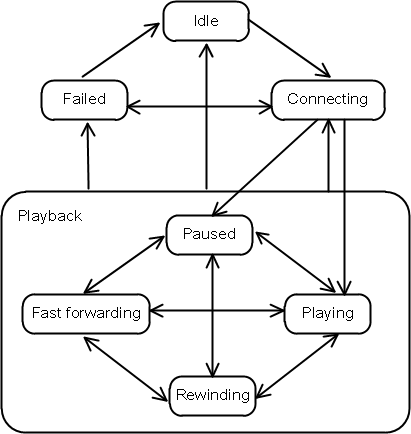
Some IIPs may require additional configuration in the form of parameters, specified at build time. See the IIP reference for a list of the available IIPs and their descriptions. The Media Service automatically selects which elements to use to successfully decode the content. No explicit indication is needed from the application at run time. Media PlayerA Media Player instance always has a well defined state. Depending on its state, the Media Player responds differently to commands from the application. Two Fundamental State MachinesThe Media Player state is a combination of the states in two separate state machines. One of the state machines is primarily controlled by the application and the other is primarily controlled by events on the network. They are not completely independent since application actions may affect the network and the network may affect what the application is allowed to do, but for the sake of simplicity it helps to think of them as independent of each other.
The Media Player state machine has the following states:
The Media Player never enters The state machine controlled by events on the network has two states only:
See
Unreachable StatesSome of the states may not be reachable by the Media Player, depending on the stream source or format. For example,
a media stream received over a multicast channel cannot be put in the
When a state transition is not possible, the application is notified in one of two ways, depending on the latency involved to get that information from the stream source. The application must always be prepared to handle both mechanisms:
CapabilitiesOngoing sessions have a number of capabilities that indicate which operations are possible at any given time. These capabilities are represented by a bit mask, and can be obtained by calling
For example, the absence of the capability
Changes in capabilities after a session has started are notified with the
How to use it
A typical playback session starts by calling
The The resulting pace may be different than the requested pace, depending on the limitations of the stream source and other factors. When the application wants to terminate the playback session, it calls
Every call has an impact in terms of performance. If the intention is to start another session with a different URL right away, as it typically happens during zapping, the Media Player provides PositioningSome media sources support positioning, which is indicated to the application by The information provided by the Media Player about the position includes also the valid range and the playback pace. See
If Stream InformationThe information about the stream being processed by the Media Player
can be obtained by calling
The information about the current stream can also be obtained by the
Media Player ParametersThe Media Player Parameters are a tool for providing information or fine-tuning the operation of a Media Player instance. Each Media Player instance has its own set of parameters that are applied to every new streaming session started by it. The parameters are set either by using
Some parameters can also be set at build time by the kreatv-option-streamer-config IIP or at runtime by an Infocast server. This is described in Media Player configuration. Media Session
Calling
When an application is not interested in a Media Session anymore it must release it by calling
Stream InformationA Media Session provides information about the stream that is being processed. See
Applications can be notified about changes in the stream by the
Type
The Media Session type indicates for what purpose the media is being processed. The type is represented by a bit mask, and the value can be obtained by calling
StatesThe Media Session has its own state machine, different from the Media Player. The possible states are:
getState()
or by listening to the
ON_SESSION_STATE_CHANGED event.
Media ParametersEvery Media Session has a set of parameters accesible by calling
See the list of available parameters for more information. |