| ARRIS Enterprises, Inc. Confidential Information |
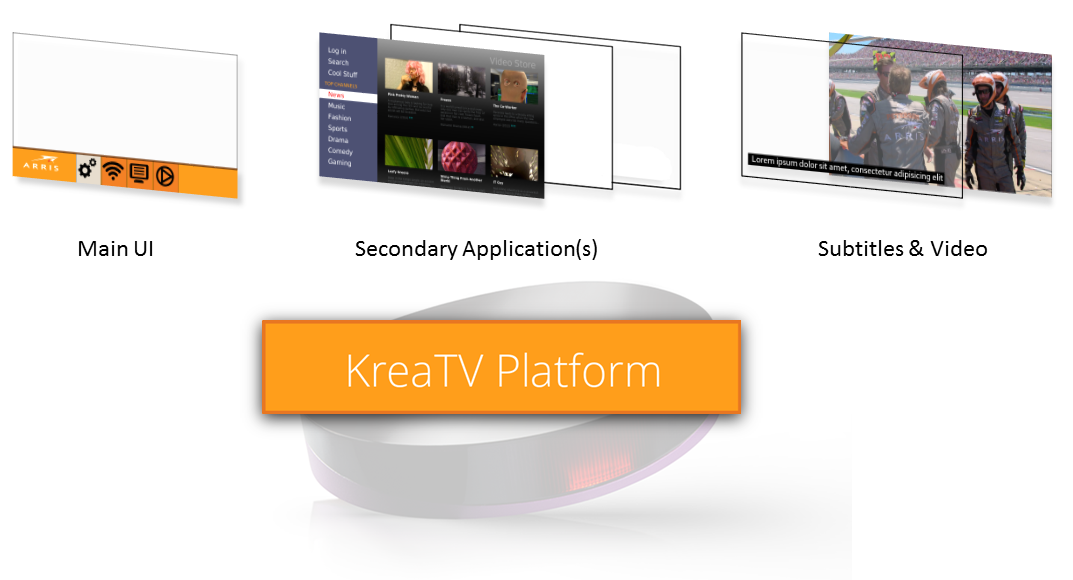
Multiple Application OverviewThe KreaTV platform supports the use of multiple applications. The primary application is a HTML browser based on WebKit, and it runs the main User Interface, implemented as a HTML/JavaScript portal or middleware. This UI is allowed to use the TOI API to communicate with and control the set-top box hardware. The primary application is responsible for managing the other applications (showing or hiding them, and choosing which application receives the remote control input).
Zero or more secondary applications may also be installed. These are separate, fullscreen instances of the HTML browser running HTML/JavaScript web applications, or native C++ applications. Secondary applications are run in sandboxed LXC containers for additional security and stability. The KreaTV platform runs and manages some additional non-interactive applications too, such as the subtitle renderer. The TOI interface is also not available for secondary applications. InstallationThe primary application is installed with the You may like to integrate web apps by creating a dedicated IIP for that web app, which you can build into the boot image. This allows some extra flexibility and customization. See the Integrating web apps page for more details. ARRIS can also provide dedicated integration with third-party web and internet services upon purchase of additional licenses. These dedicated integrations are also packaged with IIPs which can be easily added to your set-top box boot image, and contain extra material such as CA certificates and remote control mapping files, and anything else the service may require. Controlling the secondary applicationsThe main UI (referred to as "portal" from here on) is responsible for controlling the secondary applications, and handling the switching between them. The portal decides when it is time to switch to a secondary application based on for example an end-user clicking an icon in the UI. Switching is then performed by:
To transition back to the portal, the process is reversed. |