Storage Service
The storage service in KreaTV provides access to the following hardware if
connected to the STB:
- An approved USB HDD: A hard disk manufactured and supported by ARRIS.
- A Non-approved USB HDD: A 3rd party USB HDD not manufactured by ARRIS.
The service is not responsible for the use of the STB flash memory. These are controlled by
other parts of the KreaTV software.
Storage devices can currently only be connected via the USB port.
Using the Service
ToiStorageService
The ToiStorageService
interface is the entry point to the storage service. It can be used to enumerate the different
physical storage devices connected to the STB, and check their state, health and system
information etc.
The ToiStorageService interface also provides storage device management functions, such as
ToiStorageService.repair(),
ToiStorageService.prepareDvrStorage(),
ToiStorageService.prepareForRemoval() and
ToiStorageService.reconnect().
Device state transition
The storage device can be in one of 6 different states:
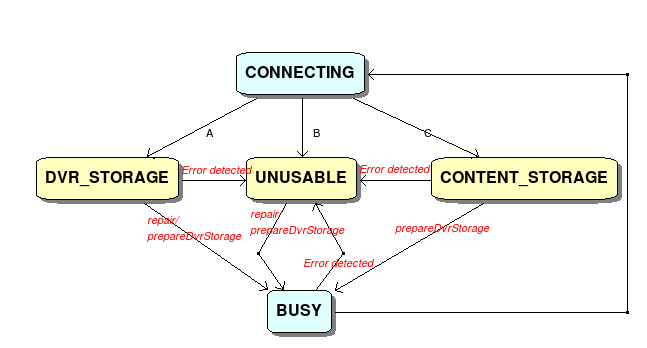
Pic 1. repair and prepareDvrStorage state diagram.
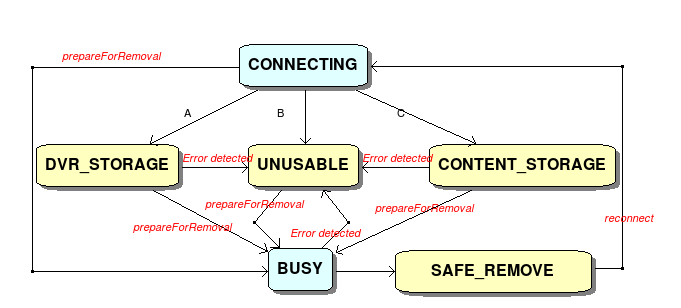
Pic 2. prepareForRemoval and reconnect state diagram.
- A: Device mounted successfully and meets DVR/Timeshift criteria
- B: Failure to mount, or SMART/ATA error detected
- C: Device mounted successfully but doesn't meet DVR/Timeshift criteria
Approved USB HDD
When an approved USB storage device is plugged in, the system will try to mount the
device automatically as a DVR storage device as long as it's mounted successfully and
meets the DVR/Timeshift criteria:
- Contains a single partition which spans the whole disk
- Has a DVR/Timeshift capable file system, i.e. EXT4
If the device does not meet the above criteria, it will be reformatted and mounted again automatically.
If the mount fails, the device transitions to DEVICE_STATE_UNUSABLE. If the mount succeeds,
the device enters DEVICE_STATE_DVR_STORAGE. In DEVICE_STATE_DVR_STORAGE state,
the device can be used not only for DVR/Timeshift without any limitations
(see DVR/Timeshift), but also for local logging.
When the device is mounted, the system will check the SMART/ATA values of the device
repeatedly and if errors occur, the device may be unmounted and enters DEVICE_STATE_UNUSABLE state
depending on the configuration. See kreatv-option-harddrive:ata_monitor_threshold.
Non-approved USB HDD
When a non-approved USB HDD is plugged in, the system will also try to mount it.
It will transition to DEVICE_STATE_DVR_STORAGE if it's mounted successfully and meets the following
criteria:
- Contains a single partition which spans the whole disk
- Has a DVR/Timeshift capable file system, i.e. EXT4
- Has an activation cookie
If the device is mounted successfully but fails to meet the criteria, the device will be mounted as a content
storage device (DEVICE_STATE_CONTENT_STORAGE) for logging and storing third-party content . If the
mount operation fails, the device will be unusable. Unlike the approved device, whether DVR/Timeshift is supported
or not in DEVICE_STATE_DVR_STORAGE state depends on the availability of licenses. See
DVR/Timeshift for more information on licenses and limitations.
The SMART/ATA errors are also checked repeatedly by the platform, but the values may not be readable from the
system. If errors are detected, an unmount operation may be taken and the device may enter DEVICE_STATE_UNUSABLE
depending on the kreatv-option-harddrive configuration. The temperature of the
device may not be readable either.
Common HDD handling
For both approved and non-approved USB HDD, if the device is unusable, applications can request a disk repair by
calling ToiStorageService.repair(). When the device is in DEVICE_STATE_DVR_STORAGE,
disk repair can also be requested but this is optional and up to the applications. After repairing, the device will be connected again.
It is recommended to call ToiStorageService.prepareForRemoval() before removing the device physically, to protect against data
loss or corruption. When the storage device transitions to DEVICE_STATE_SAFE_TO_REMOVE, calling
ToiStorageService.reconnect() can make it available to use again without physical intervention.
Calling ToiStorageService.prepareDvrStorage() when the device is in DEVICE_STATE_DVR_STORAGE, DEVICE_STATE_UNUSABLE
or DEVICE_STATE_CONTENT_STORAGE state will result in reformatting the device. In other states, this operation is not allowed.
Besides the device information, applications can also get the state change, hotplug/unplug event notifications from the service as long as
they register the related events.
Storage IIP Configuration
ARRIS provide different IIPs to handle multiple scenarios. Storage service is configured with the
kreatv-option-harddrive IIP. Some examples are listed
below.
- To configure how to manage hard drives, explicitly include and configure its parameters.
kreatv-option-harddrive
- Supporting DVR/Timeshift:
kreatv-option-dvr
- Supporting logging locally:
kreatv-option-log-file
See the IIP documentation for more details on this feature.

