| ARRIS Enterprises, Inc. Confidential Information |
Build IIPsWhen building IIPs the following is a normal workflow:
For each IIP do the following:
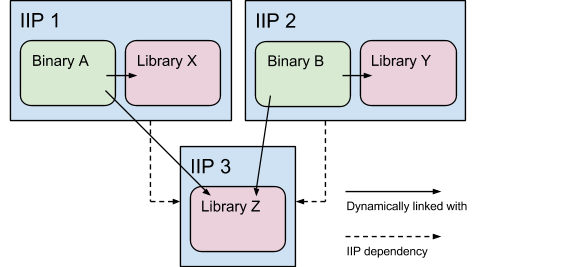
Divide into IIPsThere are a number of things to consider when deciding on what software goes into which IIP, like should an item be included in an existing IIP, or shall a new IIP be created instead. This page explains how it is intended to work. AtomicIt is desirable to be able to use the IIPs in different boot image configurations. All IIPs should be "atomic" to make sure that you only get what you want when installing an IIP in a boot image, i.e. they should only contain one part which works on its own. Avoid putting several applications into one IIP. There is however no value in adding IIPs just for the sake of it. A dynamic library used only by one binary should be put in the IIP of that binary. It is time to break the library into a different IIP only when another binary requires the same library. The following diagram illustrates this concept:
DependencyOnlyIIPs which should only be installed as dependencies, such as IIP 3
in the picture above, should have the IIP interface
property Static/dynamic librariesA C/C++ library can either be statically or dynamically linked. Static linking makes the library a part of the executable binary (and thus adds to its size). Dynamic linking makes it independent of the binary (but a dynamic library is a tiny bit bigger than a static one and is slightly more costly to load). The rule-of-thumb used in KreaTV development is simple: Keep the library static if only one executable binary links with it. Make it dynamic if two or more binaries link with it. This ensures we keep memory footprint at a minimum, which is crucial in an embedded system. Exceptions to the ruleThere are of course exceptions to the rule. Since starting a statically linked binary is a little bit faster than starting a dynamically linked binary, it may be wise to keep it static in some cases. Very small libraries are also subject to stay static since being dynamic adds a little bit of footprint. NamingThe naming of the IIP itself indicates what type of IIP you are dealing with. KreaTV IIPs follow a certain naming standard. Make sure your IIP fits in the right category. FinalizersFinalizers, i.e. IIPs named kreatv-finalize-xyz.iip, operate on the full rootdisk after all other IIPs have been installed. The DescriptionThe description part of the IIP interface shall answer these questions:
ArchitectureAn IIP (well, actually all KreaTV software) can be built on one of three different levels: architecture-independent level, toolchain level or device level. So how do you decide which level to use? Architecture independent softwareThe architecture independent level is used for software and IIPs
which, obviously, are architecture independent. Examples of this would
be configuration files, fonts, images and scripts. If your IIP only
contains such software, make sure it is architecture independent. So,
what if if you want to copy one configuration file for one set of STBs
and another for another set? Then check out
the How to make the install
script do different things for different architectures chapter
below. Example of an architecture-independent IIP file
name: Toolchain specific softwareMost software and IIPs are built on "toolchain level". The same
toolchain is used for several devices, meaning we do not have to
compile unique binaries for each device. Example of a toolchain level
IIP file name: Device specific softwareThe exception to the rule: Some software is built specific to the device on which it will run. Device specific software is typically sitting close to the hardware, e. g. kernels and kernel drivers. Software should only be built device specific if there are technical reasons for it; you shall not compile software device specific or put software in a device specific IIP just because the software will be run only on a certain device. The preferred choice is to build software on the toolchain level — if possible, you should use hardware probing in the code rather than building on the device level. Note that even though your IIP is built on a less specific level,
you can still install it on a device level basis. This is described in
the How to make the install
script do different things for different architectures chapter
below. Example of a device level IIP file
name: TricksHow to make the install script do different things for different architecturesSometimes you want your IIP install script to recognize for what
device or toolchain you are building the boot image. This is useful
when you for example want to use different configuration files for
different devices but the binaries are the same. In this case you
should not have separate IIPs for each device — instead, you can
use the environment variables ShellPerlHow to check if other IIPs are included in a boot imageLet us say you have IIP A and IIP B. You can install IIP A independently from IIP B and vice versa. You however want installation of IIP B to behave a bit differently if IIP A is included in the boot image. Making use of the IIP Perl module (IIP.pm) solves the problem: There is an additional helper method if you want installation to
stop if some IIP is not allowed to be installed with another IIP;
simply call Inheriting arguments and parameters between IIPsOn occasion it is useful to be able to inherit arguments between IIPs. This is discussed in more detail here. |