| ARRIS Enterprises, Inc. Confidential Information |
Boot stagesTerminology
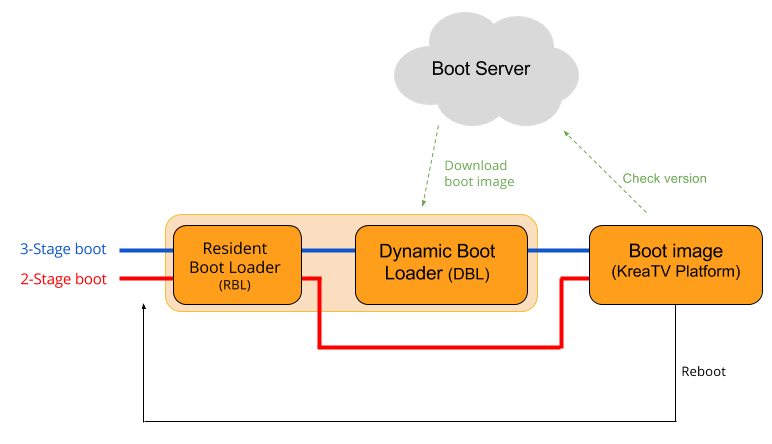
Three-stage bootThe three-stage booting process occurs when factory-new, following a disaster recovery, and any time there is no valid boot image available in the set-top box flash memory. At power on, the RBL initializes the hardware, and starts the DBL. The DBL establishes contact with the boot server, securely downloads the boot image, saves it to the flash memory, verifies that it is correctly signed, and starts it executing (ending the boot loader execution). From this point on, the Linux OS and the KreaTV platform run. Two-stage bootOnce the KreaTV platform has successfully started, it is possible, depending on how the system is configured, to enter into two-stage boot mode. In this mode, when the power is cycled, the RBL skips the DBL and launches the main software directly. As the DBL is not run in this scenario, the KreaTV platform takes the responsibility of periodically checking the network to see if a new boot image is available. The details of what happens when a new software is deployed on the server is handled in the section on using the STB flash memory. Although two-stage boot is the default behavior, it is possible to disable it if desired. |

