|
Description
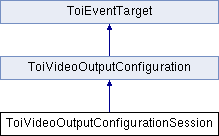
The ToiVideoOutputConfigurationSession interface allows session based changes of video output settings. If a display is (dis)connected or changed during a session (see ToiVideoOutputConfigurationDisplayChangedEvent ) while ToiVideoOutputConfigurationSession::apply() is not called for outstanding changes, the session must be either cleared or released. A call to ToiVideoOutputConfigurationSession::apply() in other cases result in undefined behavior. Releasing the session instance has the benefit of a new revert-point that matches the fall-back settings of the new display.
import "ToiVideoOutputConfigurationSession.idl";
List of all members.
Public Member Functions |
| void | setDisplayInfo (in ToiVideoOutputConfiguration::TToiVideoOutputId outputId, in ToiVideoOutputConfiguration::TToiVideoModeSequence modes, in ToiVideoOutputConfiguration::TToiAspectRatio aspectRatio) raises (TToiInvalidArgumentException) |
| void | resetDisplayInfo (in ToiVideoOutputConfiguration::TToiVideoOutputId outputId) |
| void | setDefaultVideoMode (in ToiVideoOutputConfiguration::TToiVideoOutputId outputId, in ToiVideoOutputConfiguration::TToiVideoMode mode) raises (TToiOperationNotSupportedException, TToiInvalidArgumentException) |
| void | setColorSpace (in ToiVideoOutputConfiguration::TToiVideoOutputId outputId, in ToiVideoOutputConfiguration::TToiColorSpace colorSpace) raises (TToiOperationNotSupportedException, TToiInvalidArgumentException) |
| void | setSharpness (in ToiVideoOutputConfiguration::TToiVideoOutputId outputId, in long sharpness) raises (TToiOperationNotSupportedException, TToiInvalidArgumentException) |
| void | setScartMode (in ToiVideoOutputConfiguration::TToiVideoOutputId outputId, in ToiVideoOutputConfiguration::TToiScartMode mode) raises (TToiOperationNotSupportedException, TToiInvalidArgumentException) |
| void | setScartLoopThroughMode (in ToiVideoOutputConfiguration::TToiVideoOutputId outputId, in ToiVideoOutputConfiguration::TToiValueMode mode) raises (TToiOperationNotSupportedException, TToiInvalidArgumentException) |
| void | setDviMode (in ToiVideoOutputConfiguration::TToiVideoOutputId outputId, in ToiVideoOutputConfiguration::TToiValueMode mode) raises (TToiOperationNotSupportedException, TToiInvalidArgumentException) |
| void | setColorSystem (in ToiVideoOutputConfiguration::TToiColorSystem colorSystem) raises (TToiOperationNotSupportedException, TToiInvalidArgumentException) |
| void | setRfmChannel (in ToiVideoOutputConfiguration::TToiVideoOutputId outputId, in ToiVideoOutputConfiguration::TToiRfmChannel channel) raises (TToiOperationNotSupportedException, TToiInvalidArgumentException) |
| void | revert () raises (TToiOperationNotSupportedException) |
| void | clear () |
| void | apply () raises (TToiOperationNotSupportedException) |
| void | releaseInstance () |
Member Function Documentation
Applies the changes made in the configuration session and makes the changes permanent.
- Exceptions:
-
| void ToiVideoOutputConfigurationSession::clear |
( |
| ) |
|
Clears this configuration session to a clean state.
| void ToiVideoOutputConfigurationSession::releaseInstance |
( |
| ) |
|
This function releases the resources used by this instance and ends the configuration session. If ToiVideoOutputConfigurationSession::apply() has not been called, the session configuration is lost. When this function returns all observers has also been released.
Resets display information that has been overridden using ToiVideoOutputConfigurationSession::setDisplayInfo(). The overridden values are reset to values retrieved from the EDID if one is available, otherwise default values.
- Parameters:
-
| outputId | Video output identifier. |
Reverts a configuration session to the state it had when first being created, even if changes have been applied. The reverted configuration is not applied until ToiVideoOutputConfigurationSession::apply() is called.
- Exceptions:
-
Configures the color space of the video.
- Parameters:
-
| outputId | Output identifier. |
| colorSpace | The new color space. |
- Exceptions:
-
Set color system, e.g. NTSC or PAL.
- Parameters:
-
| colorSystem | Color system setting. |
- Exceptions:
-
Configures the default video output mode. This will be used when no adaptive video mode rules are applicable.
- Parameters:
-
| outputId | Output identifier. |
| mode | The new output mode. |
- Exceptions:
-
Sets information about the display connected to a video output. This is primarily used to give information about displays that cannot provide this information themselves, but can also be used to override the video output capabilites of a display, e.g. if a TV set supports other settings than the EDID indicates.
- Parameters:
-
| outputId | Video output identifier. |
| modes | The supported video modes. |
| aspectRatio | The aspect ratio of the display. |
- Exceptions:
-
Sets the DVI mode for a video output. Only supported for HDMI outputs.
- Parameters:
-
| outputId | Output identifier. |
| mode | The new DVI mode. |
- Exceptions:
-
- Technical Preview:
- This method is a TECHNICAL PREVIEW, it may change. Set TV channel number for RF output.
- Parameters:
-
| outputId | Video output identifier. |
| channel | TV channel number. |
- Exceptions:
-
Sets the SCART standby loop through mode for a video output. Only supported for SCART outputs.
- Parameters:
-
| outputId | Output identifier. |
| mode | The new SCART standby loop through mode. |
- Exceptions:
-
Sets the SCART mode for a video output. Only supported for SCART outputs.
- Parameters:
-
| outputId | Output identifier. |
| mode | The new SCART mode. |
- Exceptions:
-
- Technical Preview:
- This method is a TECHNICAL PREVIEW, it may change.
Configures the sharpness of the HD video output ports.
- Parameters:
-
| outputId | Output identifier. |
| sharpness | Level of sharpness, given in percent, value between 0-100. |
- Exceptions:
-
|