| Motorola Mobility Confidential Restricted. | ||||||||||||||||||||||||||||||||||||||||||||||||
Power ManagementKreaTV 4.6.1 introduces power management. Previously there has been a very rudimentary support but now full fledged support has been added. The support spans several hardware platforms as well as energy saving programs:
Deprecated/Modified Legacy Items
Using Power ManagementPower ProfilesA power profile is a way of describing power consumption levels. The following profiles are defined:
Passive standby and active standby low are collectively known as low power states. InterfacesThe following interfaces implement power management:
The last two interfaces implements the handshaking procedure, for more details. Please see the API Reference tab describes the API further.Access to the power management services is granted by creating a power control instance using the platform service interface. Applications are required to register for power control. Only in very, very rare cases can the application be excused. Subsequent actions are done through the power control and power control observer interface. ConfigurationPower management is configurable in two ways:
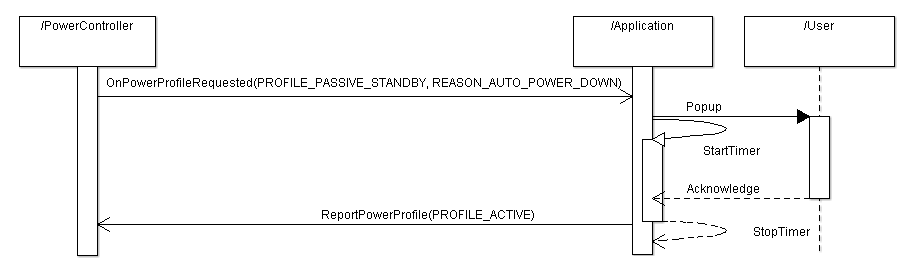
Auto Power Down (APD)Auto power down is a mandatory feature of all supported energy saving program. It ensures that the IP-STB automatically switches to the least energy consuming profile deemed appropriate by the operator after a certain period has elapsed since the last user interaction. A user interaction can be either a remote button press or a press on a front panel button. Which power profile to use as the lowest is fully configurable at build time. Note that this value is used system wide i.e. the same lowest profile will be used regardless of how a power profile switch is initiated. This is a design decision taken to simplify the implementation. The default APD timeout is always set to four hours. Depending on the chosen power management scheme the APD timeout is allowed to vary as described in the table below:
Note:
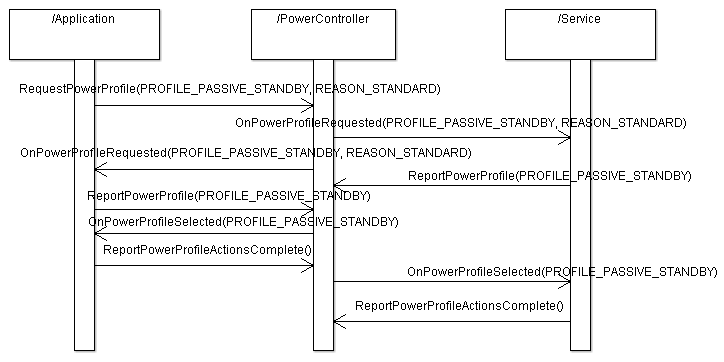
HandshakingCentral to power profile switching is the handshaking procedure. When the standby button is pressed or the APD timer expires, the power controller will notify all applications and services that a power profile switch is about to take place as well as the reason for making the switch. Each recipient of the event reports back if the switch is acceptable. If the suggested power profile isn't acceptable the service or application must report which energy profile it can accept. The power controller chooses the most energy consuming profile among the suggested profiles and broadcasts the result. Note that it is only allowed to vote for staying in the active profile if the reson for switching power profile is that the APD timer has expired. Below is an example of the handshaking procedure when the end-user presses the standby button on the RCU:
In active standby and active standby low it is still possible to use TOI because the SoC still has power. However, care must be taken since KreaTV have very few safeguards against using hardware that has been powered down. In active standby no operation involving audio and/or video shall be done. Active standby low SHALL NOT be used in its current state at all. It is up to the application to handle ongoing recordings, channel scans, updates etc. when the IP-STB is about to switch power profile. If a streamer, either player or recorder, are left active when the controlling application reports back that it is finished, the media manager will force a shutdown of the open streamers. The handshaking procedure is slightly different if the APD timer expires, see below:
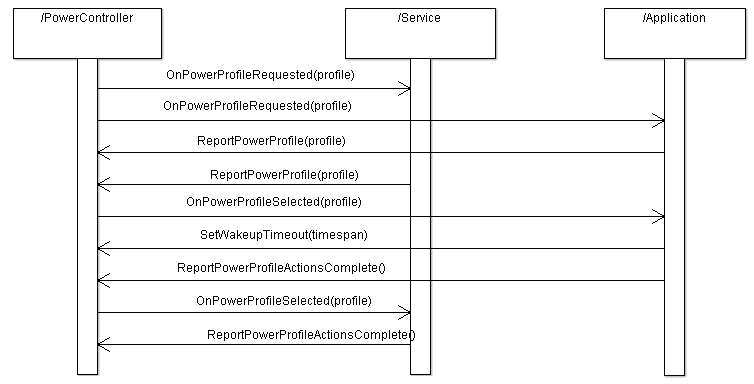
Scheduled WakeupIf a service or an application needs the IP-STB to change power mode to perform some kind of activity a wakeup timer can be set during the handshaking procedure. When the timer expires the IP-STB will switch to active standby. It isn't possible to switch to the active power profile. To allow for some margin the IP-STB will actually come out earlier so that hard disks and network interfaces are setup properly. If more than one timer is set the one closest in time will be choosen, the rest will be rejected meaning that applications and services need to set new timers when a power profile switch occurs. There are two methods of scheduling a wake up:
The first approach is the recommended one and shall be used during the handshaking procedure as illustrated below:
After a period of time the power controller will try to switch the IP-STB back to the low power state which it came from. This is done by starting the handshaking procedure. The switch can be rejected just as usual if the activities haven't been completed. This behavior is similar for EStar even though it isn't strictly mandated. Note!When an application is in control, see below, then the controlling application is responsible for putting the IP-STB back into the low power state it came from. Full Application ControlIn some cases an application can be given the responsibility of initiating power profile switches. That means the power controller will not react to the standby button nor handle APD. That is completely left to the application. The handshaking procedure will still be administered by the power controller. One case where this could be an alternative is if some very special handling of the standby button is required, e.g. the operator wants a maintenance application to be launched if the standby button is pressed for more than two seconds. Another reason could be that there are legal implications. In any case to do this a license from Motorola is needed. Hardware SupportThe following table outlines the supported power profiles for each IP-STB model:
|