

| Motorola Mobility Confidential Restricted. | ||||||||||||||||||||||||||||||||||||||||||||||||||||||||||||||||||||||||||||||||||||||||||||||||||||||||||||||||||||||||||||||||||||||||||||||||||||||||||||||||||||||||||||||||||||||||||||||||||||||||||||||||||||||||||||||||||||||||||||||||||||||||||||||||||||||||||||||||||||||||||||||||||||||||||||||||||||||||||||||
|
ToiMediaPlayerBase Interface Reference DescriptionThe ToiMediaPlayerBase interface is the base interface for player instances. It contains only read-only methods and no control functionality.
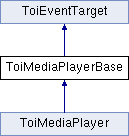
Inheritance diagram for ToiMediaPlayerBase:
Member Typedef Documentation
Active format descriptor used to identify the active video format provided in the ToiMediaPlayerBaseVideoStreamInfo structure.
Aspect ratio identifier used to identify the video aspect ratio provided in the ToiMediaPlayerBaseVideoStreamInfo structure.
Audio type identifier used to identify the audio type provided in the ToiMediaPlayerBaseAudioStreamInfo structure.
The audio channel format specifies the number of channels and desired speaker setup.
The audio channel mode specifies audio channel to speaker mappings.
List of media component entries
Media component identifier types used to set and get information about media components of a session.
Enumeration of various sources that can cause an OnError event to occur. Typically, this can be a streamer element or similar low-level component.
Media buffer types supported by the media player. Only one media buffer type is used for a given media player session
List of supported media buffer types.
Receive DMF mode used for ARIB CC/CS
Receive DMF mode used for ARIB CC/CS
Enumeration of media player states.
Subtitle format identifier used to identify the subtitle format provided in the ToiMediaPlayerBaseSubtitleStreamInfo structure.
Subtitle type identifier used to identify the subtitle type provided in the ToiMediaPlayerBaseSubtitleStreamInfo structure.
State identifier used to identify the media player timeshift state.
Member Function Documentation
Returns information about a specified audio stream in the current media stream multiplex in the form of an audio stream info structure.
Returns the capabilities present for the current session.
Returns the last error. This is typically called when state is changed to ToiMediaPlayerBase::STATE_FAILED. The result is undefined if no error has occurred.
Returns information about the current status of the media buffer.
Returns the current pace that the media stream is played with.
Get the current value of a parameter.
Returns the current position in the media stream.
Returns pace and position information for the current media session.
Returns the session identifier. This identifier can be used to open a session object with (C++) ToiMediaService::OpenSession().
Returns the current state of the media player instance.
Returns information about the current stream in form of a stream info structure. The lists of audio and video streams provided as parts of this information can be used for further exploration using the ToiMediaPlayerBase::getAudioStreamInfo() and ToiMediaPlayerBase::getVideoStreamInfo() functions, respectively.
Returns information about a specified subtitle stream in the current media stream multiplex in the form of a subtitle stream info structure.
Returns information about a specified teletext stream in the current media stream multiplex in the form of a teletext stream info structure.
Returns the last timeshift error. This is typically called after a state change to ToiMediaPlayerBase::TIMESHIFT_STATE_BUFFERING_FAILED. The result is undefined if no error has occurred.
Retrieve information about the current timeshift operation.
Returns the URL for the media stream.
Returns information about a specified video stream in the current media stream multiplex in the form of a video stream info structure.
Returns true if the player is playing from the timeshift buffer.
This function releases the resources used by this instance. When this function returns all observers has also been released.
This function makes the application subscribe to updates of a specific named parameter. When the subscription is made there will be an immediate call to ToiMediaPlayerParameterChangedEvent if there is a value available.
This function undoes the effect of a previous call to ToiMediaPlayerBase::subscribeParameter().
Member Data DocumentationThe active format descriptor is 14:9 centre. This constant can also be accessed from toi.consts.ToiMediaPlayerBase.ACTIVE_FORMAT_14_9_CENTRE. The active format descriptor is 14:9 top. This constant can also be accessed from toi.consts.ToiMediaPlayerBase.ACTIVE_FORMAT_14_9_TOP. The active format descriptor is 16:9 centre. This constant can also be accessed from toi.consts.ToiMediaPlayerBase.ACTIVE_FORMAT_16_9_CENTRE.
The active format descriptor is 16:9 with shoot and protect 14:9 centre. This constant can also be accessed from toi.consts.ToiMediaPlayerBase.ACTIVE_FORMAT_16_9_SHOOT_AND_PROTECT_14_9_CENTRE.
The active format descriptor is 16:9 with shoot and protect 4:3 centre. This constant can also be accessed from toi.consts.ToiMediaPlayerBase.ACTIVE_FORMAT_16_9_SHOOT_AND_PROTECT_4_3_CENTRE. The active format descriptor is 16:9 top. This constant can also be accessed from toi.consts.ToiMediaPlayerBase.ACTIVE_FORMAT_16_9_TOP. The active format descriptor is 4:3 centre. This constant can also be accessed from toi.consts.ToiMediaPlayerBase.ACTIVE_FORMAT_4_3_CENTRE.
The active format descriptor is 4:3 with shoot and protect 14:9 centre. This constant can also be accessed from toi.consts.ToiMediaPlayerBase.ACTIVE_FORMAT_4_3_SHOOT_AND_PROTECT_14_9_CENTRE. The active format descriptor is > 16:9 centre. This constant can also be accessed from toi.consts.ToiMediaPlayerBase.ACTIVE_FORMAT_MORE_THAN_16_9_CENTRE. The active format descriptor is same as coded. This constant can also be accessed from toi.consts.ToiMediaPlayerBase.ACTIVE_FORMAT_SAME_AS_CODED. The active format descriptor is not known. This constant can also be accessed from toi.consts.ToiMediaPlayerBase.ACTIVE_FORMAT_UNKNOWN. The aspect ratio is 16:9 This constant can also be accessed from toi.consts.ToiMediaPlayerBase.ASPECT_RATIO_16_9. The aspect ratio is 4:3 This constant can also be accessed from toi.consts.ToiMediaPlayerBase.ASPECT_RATIO_4_3. The aspect ratio is not known. This constant can also be accessed from toi.consts.ToiMediaPlayerBase.ASPECT_RATIO_UNKNOWN. The audio is prepared for the hearing impaired. This constant can also be accessed from toi.consts.ToiMediaPlayerBase.AUDIO_AUDIENCE_TYPE_HEARING_IMPAIRED. The audio is prepared for normal audiance. This constant can also be accessed from toi.consts.ToiMediaPlayerBase.AUDIO_AUDIENCE_TYPE_NORMAL. The audience type of the audio is not known. This constant can also be accessed from toi.consts.ToiMediaPlayerBase.AUDIO_AUDIENCE_TYPE_UNKNOWN. The audio is prepared for the visually impaired. This constant can also be accessed from toi.consts.ToiMediaPlayerBase.AUDIO_AUDIENCE_TYPE_VISUALLY_IMPAIRED. Four audio channels. Three front and one back speakers. This constant can also be accessed from toi.consts.ToiMediaPlayerBase.AUDIO_CHANNEL_FORMAT_3_FRONT_1_BACK. Five audio channels. Three front and two back speakers. This constant can also be accessed from toi.consts.ToiMediaPlayerBase.AUDIO_CHANNEL_FORMAT_3_FRONT_2_BACK. Five audio channels. Three front and two back speakers. One low frequency effects channel (LFE). One subwoofer speaker. This constant can also be accessed from toi.consts.ToiMediaPlayerBase.AUDIO_CHANNEL_FORMAT_3_FRONT_2_BACK_LFE. Seven audio channels. Three front, two side and two back speakers. One low frequency effects channel (LFE). One subwoofer speaker. This constant can also be accessed from toi.consts.ToiMediaPlayerBase.AUDIO_CHANNEL_FORMAT_3_FRONT_2_SIDE_2_BACK_LFE. Two content separate audio channels. Either one or two speakers. This constant can also be accessed from toi.consts.ToiMediaPlayerBase.AUDIO_CHANNEL_FORMAT_DUAL_MONO. One audio channel. One speaker. This constant can also be accessed from toi.consts.ToiMediaPlayerBase.AUDIO_CHANNEL_FORMAT_SINGLE_MONO. Two audio channels. Two front speakers. This constant can also be accessed from toi.consts.ToiMediaPlayerBase.AUDIO_CHANNEL_FORMAT_STEREO. The audio channel format is not known. This constant can also be accessed from toi.consts.ToiMediaPlayerBase.AUDIO_CHANNEL_FORMAT_UNKNOWN. The dual mono mode where the left channel is sent to both left and right front speaker outputs. This constant can also be accessed from toi.consts.ToiMediaPlayerBase.AUDIO_CHANNEL_MODE_DUAL_MONO_LEFT_ONLY. The dual mono mode where the left and right channels are mixed and sent to both left and right front speaker outputs This constant can also be accessed from toi.consts.ToiMediaPlayerBase.AUDIO_CHANNEL_MODE_DUAL_MONO_MIXED. The dual mono mode where the right channel is sent to both left and right front speaker outputs. This constant can also be accessed from toi.consts.ToiMediaPlayerBase.AUDIO_CHANNEL_MODE_DUAL_MONO_RIGHT_ONLY. The dual mono mode where the left channel is sent to the left front speaker output and the right channel is sent to the right front speaker output This constant can also be accessed from toi.consts.ToiMediaPlayerBase.AUDIO_CHANNEL_MODE_DUAL_MONO_STEREO. The normal mode where each channel is sent to its speaker output. This constant can also be accessed from toi.consts.ToiMediaPlayerBase.AUDIO_CHANNEL_MODE_NORMAL.
When this bit is set the session accepts the ToiMediaPlayer::Play([pace > 0]) command. This constant can also be accessed from toi.consts.ToiMediaPlayerBase.CAPABILITY_FASTFORWARD.
When this bit is set the session accepts the ToiMediaPlayer::Play(PACE_PAUSE) command. Freeze is similar to pause, except that when resuming a frozen session it will continue from the current live position. This constant can also be accessed from toi.consts.ToiMediaPlayerBase.CAPABILITY_FREEZE.
When this bit is set the session provides a position value which the client may read with ToiMediaPlayerBase::getPosition() and similar commands. This constant can also be accessed from toi.consts.ToiMediaPlayerBase.CAPABILITY_GETPOSITION.
When this bit is set the session supports some type of media buffering and the client can get media buffer information using ToiMediaPlayerBase::getMediaBufferInfo(). This constant can also be accessed from toi.consts.ToiMediaPlayerBase.CAPABILITY_MEDIA_BUFFER.
When this bit is set the session accepts the ToiMediaPlayer::Play(PACE_PAUSE) command. When a paused session is resumed it will continue playing from the position where the pause occured. This is similar to freeze. This constant can also be accessed from toi.consts.ToiMediaPlayerBase.CAPABILITY_PAUSE.
When this bit is set the session accepts the ToiMediaPlayer::Play([pace < 0]) command. This constant can also be accessed from toi.consts.ToiMediaPlayerBase.CAPABILITY_REWIND.
When this bit is set the session accepts the position to be set ToiMediaPlayer::playFromPosition(). This constant can also be accessed from toi.consts.ToiMediaPlayerBase.CAPABILITY_SETPOSITION.
When this bit is set the session can perform timeshift buffering operations. It will not be unset when buffering or playing from the buffer as long as the session still supports timeshift operations. This constant can also be accessed from toi.consts.ToiMediaPlayerBase.CAPABILITY_TIMESHIFT. Audio components have information of type ToiMediaPlayerBaseAudioStreamInfo. This constant can also be accessed from toi.consts.ToiMediaPlayerBase.COMPONENT_AUDIO. Denotes a regular subtitling component. This constant can also be accessed from toi.consts.ToiMediaPlayerBase.COMPONENT_SUBTITLE.
This constant can also be accessed from toi.consts.ToiMediaPlayerBase.COMPONENT_SUBTITLE_CAPTION.
This constant can also be accessed from toi.consts.ToiMediaPlayerBase.COMPONENT_SUBTITLE_SUPERIMPOSE.
This constant can also be accessed from toi.consts.ToiMediaPlayerBase.COMPONENT_TELETEXT_VBI. Video components have information of type ToiMediaPlayerBaseVideoStreamInfo. This constant can also be accessed from toi.consts.ToiMediaPlayerBase.COMPONENT_VIDEO. Media download buffer Used This constant can also be accessed from toi.consts.ToiMediaPlayerBase.MEDIA_BUFFER_TYPE_DOWNLOAD. Timeshifter buffer Used This constant can also be accessed from toi.consts.ToiMediaPlayerBase.MEDIA_BUFFER_TYPE_TIMESHIFT.
This is an Event identifier for ToiMediaPlayerCapabilitiesChangedEvent. This constant can also be accessed from toi.consts.ToiMediaPlayerBase.ON_CAPABILITIES_CHANGED.
This is an Event identifier for ToiMediaPlayerDataAvailableEvent. This constant can also be accessed from toi.consts.ToiMediaPlayerBase.ON_DATA_AVAILABLE.
This is an Event identifier for ToiMediaPlayerMediaBufferStatusChangedEvent. This constant can also be accessed from toi.consts.ToiMediaPlayerBase.ON_MEDIA_BUFFER_STATUS_CHANGED.
This is an Event identifier for ToiMediaPlayerParameterChangedEvent. This constant can also be accessed from toi.consts.ToiMediaPlayerBase.ON_PARAMETER_CHANGED.
This is an Event identifier for ToiMediaPlayerPositionChangedEvent. This constant can also be accessed from toi.consts.ToiMediaPlayerBase.ON_POSITION_CHANGED.
This is an Event identifier for ToiMediaPlayerPositionStatusChangedEvent. This constant can also be accessed from toi.consts.ToiMediaPlayerBase.ON_POSITION_STATUS_CHANGED.
This is an Event identifier for ToiMediaPlayerPresentationStatusChangedEvent. This constant can also be accessed from toi.consts.ToiMediaPlayerBase.ON_PRESENTATION_STATUS_CHANGED.
This is an Event identifier for ToiMediaPlayerStateChangedEvent. This constant can also be accessed from toi.consts.ToiMediaPlayerBase.ON_STATE_CHANGED.
This is an Event identifier for ToiMediaPlayerStreamInfoChangedEvent. This constant can also be accessed from toi.consts.ToiMediaPlayerBase.ON_STREAM_INFO_CHANGED.
This is an Event identifier for ToiMediaPlayerTimeshiftStateChangedEvent. This constant can also be accessed from toi.consts.ToiMediaPlayerBase.ON_TIMESHIFT_STATE_CHANGED.
Predefined argument value for ToiMediaPlayer::play(). Indicates that the player should play with a normal fast forward speed. This constant can also be accessed from toi.consts.ToiMediaPlayerBase.PACE_FASTFORWARD.
Predefined argument value for ToiMediaPlayer::play(). Indicates that the player should be paused. This constant can also be accessed from toi.consts.ToiMediaPlayerBase.PACE_PAUSE.
Predefined argument value for ToiMediaPlayer::play(). Indicates that the player should play with normal speed. This constant can also be accessed from toi.consts.ToiMediaPlayerBase.PACE_PLAY.
Predefined argument value for ToiMediaPlayer::play(). Indicates that the player should play with a normal rewind speed. This constant can also be accessed from toi.consts.ToiMediaPlayerBase.PACE_REWIND.
Predefined argument value for ToiMediaPlayer::playFromPosition(). Indicates that the player should stop playing from the timeshift buffer and instead start playback of the live stream. This constant can also be accessed from toi.consts.ToiMediaPlayerBase.POSITION_LIVE. Automatic mode. This constant can also be accessed from toi.consts.ToiMediaPlayerBase.RECEIVE_DMF_MODE_AUTO. Non-automatic mode. This constant can also be accessed from toi.consts.ToiMediaPlayerBase.RECEIVE_DMF_MODE_NON_AUTO. Select mode. This constant can also be accessed from toi.consts.ToiMediaPlayerBase.RECEIVE_DMF_MODE_SELECT. Special mode. This constant can also be accessed from toi.consts.ToiMediaPlayerBase.RECEIVE_DMF_MODE_SPECIAL. Automatic mode. This constant can also be accessed from toi.consts.ToiMediaPlayerBase.RECORD_DMF_MODE_AUTO. Non-automatic mode. This constant can also be accessed from toi.consts.ToiMediaPlayerBase.RECORD_DMF_MODE_NON_AUTO. Select mode. This constant can also be accessed from toi.consts.ToiMediaPlayerBase.RECORD_DMF_MODE_SELECT. ToiMediaPlayerBase::SOURCE_BITBAND - A BitBand element has failed for some reason.
This constant can also be accessed from toi.consts.ToiMediaPlayerBase.SOURCE_BITBAND. ToiMediaPlayerBase::SOURCE_INTERNAL - An internal failure occured before an error code could be retrieved. This constant can also be accessed from toi.consts.ToiMediaPlayerBase.SOURCE_INTERNAL. ToiMediaPlayerBase::SOURCE_UNKNOWN - An error of unknown type has occurred. This constant can also be accessed from toi.consts.ToiMediaPlayerBase.SOURCE_UNKNOWN. In ToiMediaPlayerBase::STATE_CONNECTING the media player has an active session and is in the process of establishing a connection to a media stream source. The media player will leave this state automatically and enter ToiMediaPlayerBase::STATE_PAUSED when it has successfully established the connection to the stream source. If the media player decides it cannot connect, it will enter ToiMediaPlayerBase::STATE_FAILED instead. If the application is not interrested in knowing when the player has connected, it may call ToiMediaPlayer::play() to set the player in ToiMediaPlayerBase::STATE_PLAYING directly. The application may also end the session by calling ToiMediaPlayer::close(), which makes the player go to ToiMediaPlayerBase::STATE_IDLE. This constant can also be accessed from toi.consts.ToiMediaPlayerBase.STATE_CONNECTING.
In ToiMediaPlayerBase::STATE_FAILED the media player may or may not have a connection to a media source but the process of getting the stream from that source has failed in some fatal way. The media player will only leave ToiMediaPlayerBase::STATE_FAILED on a call by the application to ToiMediaPlayer::close(). This constant can also be accessed from toi.consts.ToiMediaPlayerBase.STATE_FAILED. In ToiMediaPlayerBase::STATE_FASTFORWARDING the media player has a connection to a media source and plays the stream from that source in forward direction at a pace above normal playback. For streams on which this operation cannot be performed, this state is not available. On a command from the application, the player will leave this state for one of the other playback states ToiMediaPlayerBase::STATE_PLAYING, ToiMediaPlayerBase::STATE_PAUSED, or ToiMediaPlayerBase::STATE_REWINDING. The application may also end the session by calling ToiMediaPlayer::close(), which makes the player go to ToiMediaPlayerBase::STATE_IDLE. If an error occurs with the stream severe enough for the player to determine it cannot continue playback, the player will go to ToiMediaPlayerBase::STATE_FAILED. This constant can also be accessed from toi.consts.ToiMediaPlayerBase.STATE_FASTFORWARDING.
In ToiMediaPlayerBase::STATE_IDLE there is no active session. The media player does not handle a stream, and consequently has no connection to a media stream source. All functions requiring a session will raise a TToiSessionViolationException in ToiMediaPlayerBase::STATE_IDLE. The media player will only leave ToiMediaPlayerBase::STATE_IDLE on a successful call to ToiMediaPlayer::open(). This constant can also be accessed from toi.consts.ToiMediaPlayerBase.STATE_IDLE.
In ToiMediaPlayerBase::STATE_PAUSED the media player has a connection to a media source but playback is halted. On a command from the application, the player will leave this state for one of the other playback states ToiMediaPlayerBase::STATE_PLAYING, ToiMediaPlayerBase::STATE_FASTFORWARDING, or ToiMediaPlayerBase::STATE_REWINDING. The application may also end the session by calling ToiMediaPlayer::close(), which makes the player go to ToiMediaPlayerBase::STATE_IDLE. If an error occurs with the stream severe enough for the player to determine it cannot continue playback, the player will go to ToiMediaPlayerBase::STATE_FAILED. This constant can also be accessed from toi.consts.ToiMediaPlayerBase.STATE_PAUSED.
In ToiMediaPlayerBase::STATE_PLAYING the media player has a connection to a media source and plays the stream from that source in normal pace. On a command from the application, the player will leave this state for one of the other playback states ToiMediaPlayerBase::STATE_PAUSED, ToiMediaPlayerBase::STATE_FASTFORWARDING, or ToiMediaPlayerBase::STATE_REWINDING. The application may also end the session by calling ToiMediaPlayer::close(), which makes the player go to ToiMediaPlayerBase::STATE_IDLE. If an error occurs with the stream severe enough for the player to determine it cannot continue playback, the player will go to ToiMediaPlayerBase::STATE_FAILED. This constant can also be accessed from toi.consts.ToiMediaPlayerBase.STATE_PLAYING.
In ToiMediaPlayerBase::STATE_REWINDING the media player has a connection to a media source and plays the stream from that source in backward direction at a pace above normal playback. For streams on which this operation cannot be performed, this state is not available. On a command from the application, the player will leave this state for one of the other playback states ToiMediaPlayerBase::STATE_PLAYING, ToiMediaPlayerBase::STATE_PAUSED, or ToiMediaPlayerBase::STATE_FASTFORWARDING. The application may also end the session by calling ToiMediaPlayer::close(), which makes the player go to ToiMediaPlayerBase::STATE_IDLE. If an error occurs with the stream severe enough for the player to determine it cannot continue playback, the player will go to ToiMediaPlayerBase::STATE_FAILED. This constant can also be accessed from toi.consts.ToiMediaPlayerBase.STATE_REWINDING. The subtitles are in ARIB format. This constant can also be accessed from toi.consts.ToiMediaPlayerBase.SUBTITLE_ARIB. The subtitles are in DVB format. This constant can also be accessed from toi.consts.ToiMediaPlayerBase.SUBTITLE_DVB. The subtitles are in DVD format. This constant can also be accessed from toi.consts.ToiMediaPlayerBase.SUBTITLE_DVD. The subtitles are designed for the hearing impaired. This constant can also be accessed from toi.consts.ToiMediaPlayerBase.SUBTITLE_HEARING_IMPAIRED. The subtitles are designed for normal audience. This constant can also be accessed from toi.consts.ToiMediaPlayerBase.SUBTITLE_NORMAL. The subtitles are in Teletext format. This constant can also be accessed from toi.consts.ToiMediaPlayerBase.SUBTITLE_TELETEXT. The type of subtitles is not known. This constant can also be accessed from toi.consts.ToiMediaPlayerBase.SUBTITLE_UNKNOWN. The subtitles are in XSUB or XSUB plus format.
This constant can also be accessed from toi.consts.ToiMediaPlayerBase.SUBTITLE_XSUB. In ToiMediaPlayerBase::TIMESHIFT_STATE_BUFFERING the media player is buffering the current media source to the timeshift buffer. In this state the capabilities change to include trick play capabilities such as pause, fast forward and rewind. This constant can also be accessed from toi.consts.ToiMediaPlayerBase.TIMESHIFT_STATE_BUFFERING. In ToiMediaPlayerBase::TIMESHIFT_STATE_BUFFERING_FAILED the timeshift buffering has failed for some reason. The reason can be retrieved by calling ToiMediaPlayerBase::getTimeshiftError(). The media player will only leave ToiMediaPlayerBase::TIMESHIFT_STATE_BUFFERING_FAILED on a call by the application to ToiMediaPlayer::discardTimeshiftBuffer(). This constant can also be accessed from toi.consts.ToiMediaPlayerBase.TIMESHIFT_STATE_BUFFERING_FAILED. In ToiMediaPlayerBase::TIMESHIFT_STATE_INACTIVE the timeshift operation is not enabled. The capacity of the buffer is unknown and the capabilities are the same as for the current media source, e.g. if you play a multicasted stream, trick play capabilities such as pause, fast forward and rewind are not allowed. This is also the default state for the normal timeshift recording policy when closing the media session, see ToiInformationService::CFG_MEDIA_TIMESHIFT_RECORDINGPOLICY. This constant can also be accessed from toi.consts.ToiMediaPlayerBase.TIMESHIFT_STATE_INACTIVE. In ToiMediaPlayerBase::TIMESHIFT_STATE_STOPPED the timeshift buffering has been stopped for some reason. The reason might be that ToiMediaPlayer::stopTimeshiftBuffering() has been called or the buffer has become full and could not continue buffering. This is also the default state for the continuous timeshift recording policy when closing the media session, see ToiInformationService::CFG_MEDIA_TIMESHIFT_RECORDINGPOLICY. This constant can also be accessed from toi.consts.ToiMediaPlayerBase.TIMESHIFT_STATE_STOPPED. Indicates cancel flag set. This constant can also be accessed from toi.consts.ToiMediaPlayerBase.VIDEO_3D_FORMAT_CANCELED. Indicates SEI message absent. This constant can also be accessed from toi.consts.ToiMediaPlayerBase.VIDEO_3D_FORMAT_NOT_SPECIFIED. Checkboard based arrangement. This constant can also be accessed from toi.consts.ToiMediaPlayerBase.VIDEO_3D_SRC_FORMAT_CHECKERBOARD. Column based arrangement. This constant can also be accessed from toi.consts.ToiMediaPlayerBase.VIDEO_3D_SRC_FORMAT_COLUMN_BASED. Reserved values. This constant can also be accessed from toi.consts.ToiMediaPlayerBase.VIDEO_3D_SRC_FORMAT_RESERVED. Row based arrangement. This constant can also be accessed from toi.consts.ToiMediaPlayerBase.VIDEO_3D_SRC_FORMAT_ROW_BASED. Side-by-side packing arrangement. This constant can also be accessed from toi.consts.ToiMediaPlayerBase.VIDEO_3D_SRC_FORMAT_SIDE_BY_SIDE. Temporal interleaving arrangement. This constant can also be accessed from toi.consts.ToiMediaPlayerBase.VIDEO_3D_SRC_FORMAT_TEMPORAL. Top-bottom packing arrangement. This constant can also be accessed from toi.consts.ToiMediaPlayerBase.VIDEO_3D_SRC_FORMAT_TOP_BOTTOM. |