| Motorola Mobility Confidential Restricted. |
Application Service OverviewThe Application Service is responsible for handling applications in the system. An application is a software module which, in contrast to a service in the platform, is designed to interact with the user. The basic functionality of the Application Service is to facilitate concurrent execution of multiple applications. OverviewAn application can not run in more than one instance and it is always in a valid state. The Application Service manages the state (life cycle) of applications and maintains a database with information about all applications. The information in this database is referred to as the application properties. The process of selecting which application to put in front of the others on the TV screen and receive user input (i.e., the active application, see the Application States section) is an integral part of the user interface behavior. Since user interaction is strictly the domain of the application layer, this decision must be taken by the applications themselves (usually a specific "Navigator" application is used to decide which application to activate). The Application Service only provides functions through TOI to execute the final decision. For the applications to be able to handle the user interface consistently and make informed decisions on application activation, the Application Service provides a subscription facility. It can be used by applications to receive notifications on application state change events. The Application Service also has a supervising role. It constantly monitors the execution of each individual application. When it detects a faulty application, that application is terminated and may be restarted. The specific restart behavior is dependent on the configuration of that particular application. In particular if the application fails to respond to ping within a given time, it will be killed instantly in an attempt to sustain system integrity.
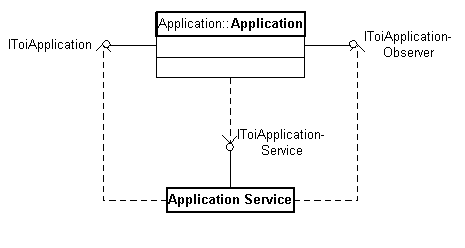
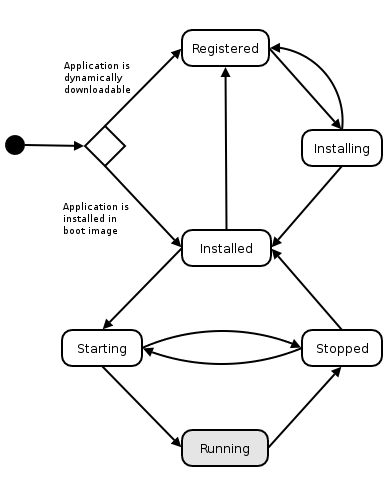
Application Service interaction graph. Application StatesThe main responsibility of the Application Service is to manage the states of the applications. The applications can be in eight different states: registered, installing, installed, starting, invisible, visible, active and stopped.
Application state diagram.
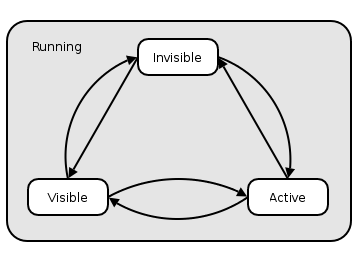
The running state in the diagram above holds three sub-states. These states is described below:
State diagram of the "running" states.
State ChangesOnly one application can be active (in the active state) at a time and there can only be one visible application (in the visible state). When the Application Service is told to activate an application it will not only change the state of the application that is activated. It will also change the state of the currently active application and possibly the visible application if there is one. When this process is complete there is no longer any application in the visible state. Applications can be downloaded, installed, and uninstalled if KreaTV Dynamic Download and Application Download is enabled on the platform. Note! Activating an application affects the state of several applications. Application ActivationThe Application Service publishes three functions to activate applications: activate(), activateWithUri() and activateWithCommand(). The first one is used to activate an application, and nothing more, while the activateWithUri() function tells the newly activated application to "load a URI" and the activateWithCommand() function tells the newly activated function to "perform a command". Activate with URIThe activateWithUri() function is used to tell an application to handle a URI. To "handle" or "load" a URI means that the application should load the data pointed to by the URI. As an example, you could tell a web application to handle http://www.example.com or a music jukebox application to handle http://www.example.com/music.mp3. Hopefully this would be interpreted by the web application as if it should load the web page and by the jukebox application as if it should play the music file. Since applications normally do not know which URI should be handled by which application they should use the URI Loader Service instead. The URI Loader Service decides which application is most suitable for the job and calls the activateWithUri() function in the Application Service. The Application Service informs the activated application about which URI to load by calling LoadUri() on the application's IToiApplication interface. Activate with CommandActivation with a command is used to tell an application to perform a certain task. The Application Service informs the activated application about which command to perform by calling ExecuteCommand() on the application's IToiApplication interface. The Application Service is not interested in what commands are available. It is up to each application to define and interpret the commands it supports, and the caller is responsible for knowing what commands a certain application can handle. This function is typically used by a Navigator application, e.g., to tell a web application to go "back" or "forward" or to tell a TV application to switch to a certain channel. Loading of URIsSpecial requirements apply for applications handling the LoadUri() call on the IToiApplication interface. URI and MIME Type MappingsThe Application Service maintains a database with combinations of URI and MIME types that applications in the system are capable of handling. This database is initialized from the specifications provided in the application property files. When the Application Service has received a load request, it searches its database for a suitable application to handle that request. If it finds a matching application, it uses the Application Service to activate that application and send the URI and MIME type along with that request. If the Application Service cannot find an application to handle the load request an exception is thrown. Selection AlgorithmIt is possible for an application to register for either a URI type, a MIME type or a combination of URI and MIME types. The algorithm that selects application, between several applications to activate, is the following:
Note that the algorithm does not try to find an application that has registered for the URI type only, if a MIME type is included in the request. See also: TOI Application Service Interface |