| ARRIS Enterprises, Inc. Confidential Information |
Application Service OverviewThe Application Service is responsible for handling applications in the system. An application is a software module which, in contrast to a service in the platform, is designed to interact with the user. The basic functionality of the Application Service is to facilitate concurrent execution of multiple applications.
OverviewTo manage the behaviours of different types of applications, each application is designated as one of the three following types:
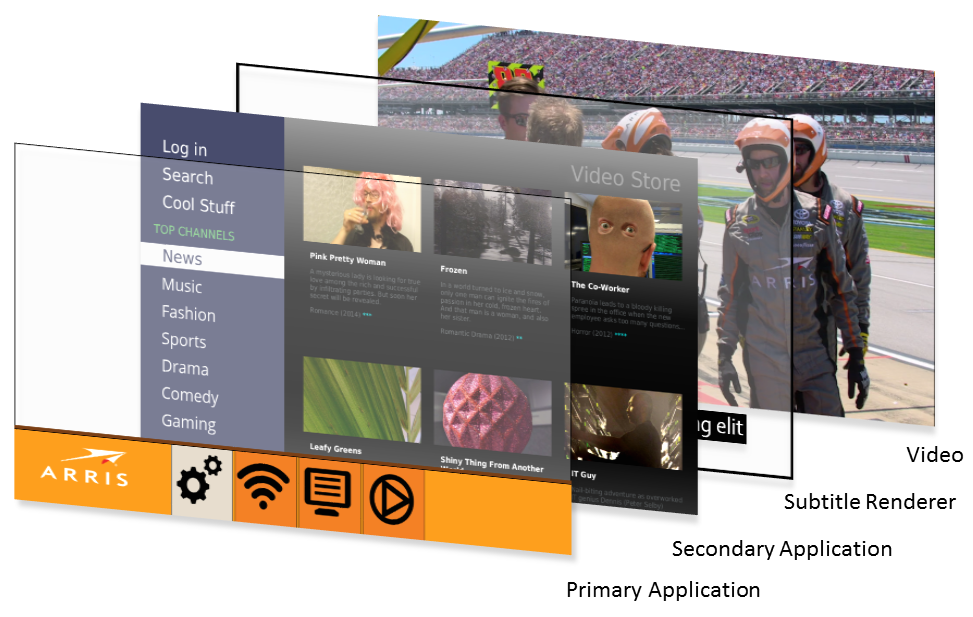
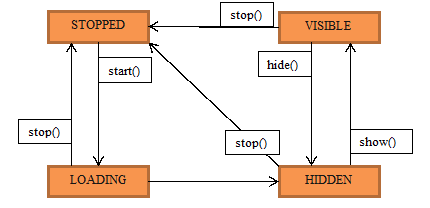
The Application Service can retrieve all secondary applications for use by the user interface. It manages the state and life cycle of secondary applications through the use of an internal database. The information in this database is referred to as the application properties. The process of deciding which application should be visible and receive user input is the responsibility of the user interface, which is implemented in the primary application. The Application Service supplies the interface to implement this functionality but avoids making autonomous decisions whenever possible, except in cases such as resource constraints or crashes. This means that the user interface needs to actively decide which secondary applications to make visible and when they should receive input. The primary application is always visible on top of any running secondary applications. This enables functionality in the primary application such as rendering popups or menus on top of other applications. It also means that the primary application needs to make itself transparent in order for any secondary applications to actually become visible to the end user. Application StatesThe main responsibility of the Application Service is to manage the states of the secondary applications. The secondary applications can be in four different states: STOPPED, LOADING, VISIBLE, HIDDEN.
secondary Application state diagram.
Setting input focusOnly one primary or secondary application can have input focus. As a consequence, setting input focus to a secondary application will remove input focus from whatever application had it previously. Setting input focus to the primary application is done by resetting input focus via the Application Service. Input handlingMaking input focus exclusive to one application is intended to simplify input handling. In order to enable the primary application to retain control when it has lost input focus, it can eavesdrop on predefined inputs via subscribeKey(). Subscribing via subscribeKey() is done for each secondary application and may be done at any time. This relieves the primary application from the need to keep explicit track of which, if any, secondary application currently has input focus. A secondary application cannot have input focus if it is not VISIBLE. A secondary application that has input focus and leaves the VISIBLE state for any reason will automatically relinquish input focus back to the primary application. See also: See also: |