| Motorola Mobility Confidential Restricted. | ||||||||||||||||||||||||||||||
Media ServiceThe media service provides interfaces for controlling playback and recording of streaming media. The service is capable of handling a broad range of media content in different formats from numerous sources. It is very flexible in many ways:
The media service is capable of handling multiple media player instances concurrently. Each instance has the capacity of handling one media stream. Two player instances running on the same system are completely separated from each other. Regardless what happens to one player, the other players on the system are unaffected. OverviewThe media service provides a number of streaming media resources to applications:
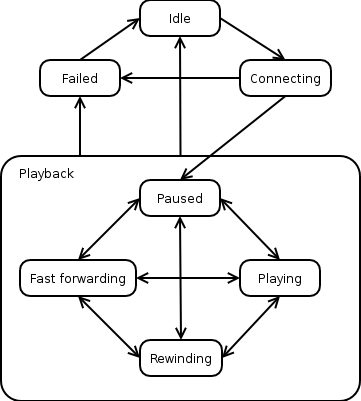
In general, an application may have a number of concurrent instances of the different media resources. Since the hardware limits what is possible to do, the KreaTV IP-STB platform performs the resource management necessary to keep the right media player instance visible to the user. Media PlayersMedia Player StatesA media player instance has a well defined state in every moment of time. Depending on the state, the player responds differently to commands from the application. Two Fundamental State MachinesThe player state is a combination of the states in two separate state machines. One of the state machines is primarily controlled by the client application, and the other is primarily controlled by events on the network. They are not completely independent since application actions may affect the network and the network may affect what the application is allowed to do, but for the sake of simplicity, it helps to think of them as independent of each other.
The media player state machine controlled by the client application. The media player state machine controlled by the client application has the following states:
The Paused, Playing, Rewinding, and Fast Forwarding states are collectively referred to as Playback states. Depending on the media source used, some of the state transitions between the playback states may not be supported. See the section Limitations Imposed by Stream Clients below for more information. The state machine controlled by events on the network has two states only:
For example, assume that the application instructs the media player to start playing a stream from a multicast channel. When stream data arrives to the player it makes a state transition from No Data to Data Available. If there is serious congestion on the network so that IP packets occasionally do not reach the destination and the user experience is affected, the player temporarily goes to No Data. It returns to Data Available when the stream feed is stable again. However, if the packet loss is not serious enough to affect the user, the player should remain in Data Available. In addition to the two states described above, the player keeps track of its position in the media stream. Depending on the stream source the position has slightly different semantics. SessionsThe media player is said to have an active session when it is in any other state than the Idle state. Under normal conditions, having an active session means that the media player is processing a media stream. However, that is not always the case. The media player will never assume the Idle state without being explicitly told by the application to do so. This is a very important property of the media player state machine. Events from the network can never put the player in the Idle state and thereby terminating the session. If an error occurs with the network connection, and that error is determined to be fatal to the communication with the server, the media player puts itself in the Failed state, which gives the application an opportunity to clean up on its side before ending the session and possibly starting a new one. Limitations Imposed by Stream ClientsThe properties of the access method used to receive the media stream may have impact on the media player state machine. For example, a media stream received over a multicast channel cannot be put in the Rewinding state, since the media player has no control of the transmission of the stream. Its only option is to play the stream as it is received from the network, or stop playing it completely. The part of the media service responsible for receiving stream data from the network or other sources is designed for extensibility. The design allows for stream client plugins to be hooked in to the media service. Depending on the set of stream client plugins the media service is configured with, it will understand different network protocols. Consequently, depending on the stream client used, some of the state transitions in the media player state machine may not be possible to perform. In the previous example, the multicast stream client was unable to rewind the stream. In particular, transitions to all playback states (Playing, Paused, Fast Forwarding, and Rewinding) are not possible to perform for all media stream clients. When a state transition is not possible to perform, the application is notified about this fact in one of two ways, depending on the latency involved to get that information from the stream source. The application must always be prepared to handle both mechanisms:
Media Player ParametersAdjusting media player parameters is a tool for fine-tuning the operation of a media player instance. Each player instance has a private set of parameters. The value of parameters are modified either by using the SetParameter function or by specifying an extended URL to the Start function. If the SetParameter function is called in the Idle state, the change affects the default value of the parameter for that particular media player instance. The default value is the value assigned to the parameter when starting a new session, in case the parameter is not explicitly defined in the URL argument to the Start method. If the SetParameter function is called in any other state but the Idle state, the change affects the current session only. Some parameters can be changed in the configuration file as well. This is described in the Media Service Configuration document. Stream InformationThe amount of information available about the stream the media player currently is playing depends on the stream format. The media player differentiates between the following stream formats: elementary, system, program, transport, and RTP streams. Elementary streams are the simplest stream format, which can only contain one audio stream or one video stream. The other stream formats can hold several audio and video streams as well as other information streams such as subtitles and teletext. The OnStreamInfoChanged EventThe OnStreamChanged event is emitted to observers/listeners at three different occasions: Right after start of playing a stream, when the stream infomation changes and when changing active video or audio stream. The following table describes when the event is emitted and what stream information is made available:
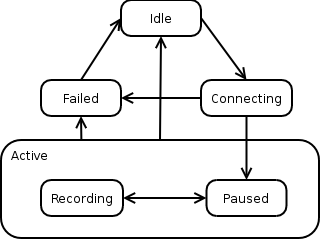
Media Player CapabilitiesA session has a number of capabilities. A capability can for example indicate that the current media player can rewind or that it supports timeshift. See the API documentation for the media player for a list of available capabilities. The capabilities change depending on the currently played media source. They can also change when starting timeshift buffering or when switching to the timeshift buffer. The OnCapabilitiesChanged EventThe OnCapabilitiesChanged event is emitted to observers/listeners when capabilities have changed. See the API documentation for the media player. TimeshiftIf the current media source has the timeshift capability, it is possible to start timeshift buffering. When timeshift buffering has been started, the media player will get pause and rewind capabilities. After a rewind or pause, the media player starts playing from the timeshift buffer instead of from the live stream and it becomes possible to trick play in the timeshift buffer. When the boot image is configured, it is possible to select whether the timeshift buffer should be circular and how much data it should be able to hold. A circular buffer is a fixed-size space that keeps the most recently written data; old data that doesn't fit inside the configured size is overwritten as new data arrives. Media RecordersMedia recorders do not decode the media stream. Instead, they store the incoming media stream to media assets. See the Asset Manager Service for information about media assets. Just like media players, media recorders have a state machine that is mostly controlled by the application and sessions. However, the set of states and commands differ.
The media recorder state machine controlled by the client application. The media recorder state machine controlled by the client application has the following states:
See also: TOI Media Service Interface |
||||||||||||||||||||||||||||||