EIT Cache Service
Introduction
The KreaTV EIT cache service is used to non-persistently cache DVB EIT data
received embedded into MPEG transport streams. The cache supports the
following features from EN 300 486 v1.8.1:
- EIT present/following on actual and other transport stream
- EIT schedule on actual and other transport stream
- EIT NVOD
- Retrieval of content from private_data_descriptors
- Audio, video and subtitle event component lists
Overview
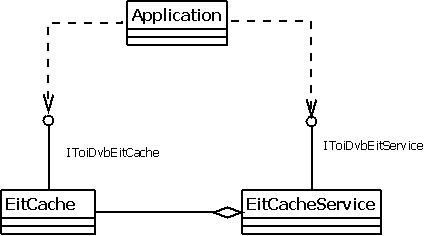
Using the Service
In the EIT cache, as in standard DVB EIT, an event is identified using an event_id and a service is identified using the triplet:
- original_network_id
- transport_stream_id
- service_id
Interface
There are three (3) TOI interfaces that applications can use to interact with EIT service:
-
ToiDvbEitService is the main interface of the EIT
service. This is the interface which the EIT service registers with the
system's name service. The interface is used by applications to create
their own EIT cache instance.
-
ToiDvbEitCache is an interface that provides access to
the EIT present/following and schedule events. EIT events may be sent
out using different languages. In that case, the EIT cache will store
only data from one language. The language used is decided by the
configuration variable "cfg.locale.ui" (Deprecated alias is
"config.uilanguage").
-
ToiDvbEitCache Event Subscriptions provides events to be subscribed by applications.
Configuring
Before the service can start caching DVB EIT data, two things must be configured in the cache:
- The services that should be cached needs to be added, using the
ToiDvbEitCache::addService() method.
- The EIT cache also needs to be told what kind of EIT tables to cache; p/f
only or p/f and schedule. This is done using the
ToiDvbEitCache::setFilterMode() method.
EIT Cache Service Behavior
EIT Cache Instances
Application use the ToiDvbEitService interface to create their own EIT
cache instance(s). The EIT cache service maintains a database in which
applications are paired with their EIT cache instances. An application is
allowed to create more than one EIT cache instance. Also, it is allowed to
have multiple applications with their own EIT cache instances at the same
time. However the total number of EIT cache instances created at one time
can be at most five (5). Here is some sample code (JavaScript) for creating
an EIT cache instance:
eitCache = toi.dvbEitService.createInstance();
eitCache.setFilterMode(eitCache.FILTER_MODE_PF_AND_SCHEDULE);
eitCache.addEventListener(eitCache.ON_CACHE_UPDATED, onCacheUpdated);
The sample code calls the ToiDvbEitService::createInstance() to create an
EIT cache instance. It then sets the filter mode to PF and Schedule, which
means both p/f and schedule EIT data is going to be cached in the current
instance. The third line specifies an event handler to deal with
ON_CACHE_UPDATED events, which are sent when the cache data has been
updated.
Adding Events
After an instance has been creating and configured, the EIT service will
begin collecting EIT data. All EIT data that is found in any transform stream
played using a MediaPlayer will be processed. EIT data that matches
the following criteria will be cached:
EIT table and version is accepted: The
applications need to specify which services that should be cached
using the triplet Network ID, Transform Stream ID and Service ID. Only
EIT tables for a service specified are processed. Setting which
services to process is done using ToiDvbEitCache::addService().
Further more, if the EIT event has an old version number,
it will not be processed.
Table ID and Filter Mode: When filter mode is set
to FILTER_MODE_PF_ONLY, it means only P/F events are stored. So the
EIT tables that have the table ID of 0x4e or 0x4f will be cached.
When filter mode is set to FILTER_MODE_PF_AND_SCHEDULE, it means
that schedule data is also to be stored. At this time, all EIT table
IDs are accepted. This configuration is set through
ToiDvbEitCache::setFilterMode().
Time: EIT events that are too old will not be
stored in the EIT cache. If the start time + duration of the EIT
event is less than the current time, the event is considered too old
and will not be cached.
Removing Events
While updating events, the EIT cache will also remove events which are no
longer needed. These are the cases when the EIT cache will remove events:
Remove old events that have passed validation time:
If the start time plus duration of an EIT event is less than the
current time, the event is considered obsolete and will be removed.
Replace old event new event has different content:
When adding an event to EIT cache, if it is discovered that there is
an older EIT event in the cache, which has the same event id but
different content, the old event will be removed and replaced with the
new one.
Erase events overlapped by the new event:
When updating a new event, if it is discovered that the new event is
overlapping with one or more old events, the old events will be
removed. By overlapping, it means that the start time of the old event
is later than the start time of the new event but earlier than start
time plus duration of the new event, or vice versa.
NVOD Event Handling
NVOD (Near Video On Demand) events are handled differently than standard
EIT events.
Detecting NVOD events:
When parsing EIT events, if the start time is set to undefined
(all bits of the field are set to 1), as well as running status is
set to 0 (undefined), then the event is flagged as NVOD event.
Add NVOD events to cache:
If an NVOD event being processed shares the
same event id and event content with any earlier stored NVOD event,
the new event will not be added to the cache.
Remove NVOD events from cache:
If an NVOD event being processed shares the same event id but
different content with any earlier stored NVOD event,
the new event will be added into cache and the old event will be
removed.
Running_Status flag detection:
If cfg.eitcache.nvod.ignorerunningstatus is set to "TRUE",
the running_status flag would not be checked when detecting
an NVOD event. Otherwise, running_status value need to be 0x00
for an NVOD event.
Private Data Handling
Upon discovering a private data specifier, the EIT cache will start to
extract private data and appends the data to the end of its private data
buffer. This is done until the next specifier appears which means that
the private data has reached its end. The private data can be retrieved
by the application using ToiDvbEitCache::getPrivateData().
Language
EIT cache service gets system language from the information object
"cfg.locale.ui". Since EIT event descriptors can be available for multiple
languages, EIT cache service has to check the language of the incoming
EIT infomation.
When parsing EIT event, the name of the event is extracted from short
event descriptor. If the language of the short event descriptor doesn't
match current system language, the EIT event will not be cached.
Further, the information in extended event descriptors may come with
different languages too. When short event descriptor has the right
language, if the extended event descriptor doesn't, it will be left blank.
Cache Updates
To inform the user that the cache has been updated (events added or removed),
an OnCacheUpdated event is sent to all listeners. In order not to be clogged
by these events, they are sent at most every 500 ms event if new events comes
more frequent than that. The event contains information regarding which
services and time intervals that have been updated.
Fetching Data
Fetching events from the cache is done in several steps depending on what
information is needed:
- The basic event information is retrieved using
ToiDvbEitCache::getEvents(), ToiDvbEitCache::getPresentEvent() and
ToiDvbEitCache::getFollowingEvent(). This will give the user the event_id
of the event that is used to retrieve additional information for the
event.
- In order to get additional information for the event, like item data,
private data, component information, etc. the corresponding method of the
same interface shall be used with the event_id of the event as identifier.
See also: TOI
DVB EIT Service Interface
|

